Text Messaging Program & Opt-In
Aqui Aca is the sender of every text message described here. Aqui Aca is a product operated by Reflexive Labs, LLC, the entity behind the application. Messages are sent by Aqui Aca on behalf of the school a family is enrolled with — the school is named inside each message as the institution the message concerns, but Aqui Aca is always the sender. This page documents exactly how families consent to receive those messages and the confirmation step every number must pass before it can be texted.
What families receive
- Attendance notifications — for example, a text when a student is marked absent or has not arrived, sent to the guardians on that student’s record.
- Occasional school broadcasts — school-wide or group announcements sent by staff (closures, early dismissal, reminders).
Message frequency varies. Message and data rates may apply.
How families opt in
Consent is collected through the school’s digital Student Intake Form:
- A staff member at the enrolled school generates a unique intake link for a specific student and sends it to that student’s family.
- The parent or guardian opens the link and completes the form, entering the mobile numbers for the student’s guardians and emergency contacts.
- The form includes an SMS consent checkbox, unchecked by default and labeled optional. The family can submit the form without it, and opting in to text messages is never a condition of enrolling, of creating or keeping an account, or of using any part of Aqui Aca. There is no purchase, transaction, or payment involved in opting in. Checking the box opts the mobile numbers provided into the school’s texts.
- When the box is checked, the consent — the number(s) and a timestamp — is recorded on our servers as a durable proof-of-consent record. When it is left unchecked, no consent is recorded and the school cannot text those numbers (the family can opt in later).
The consent step
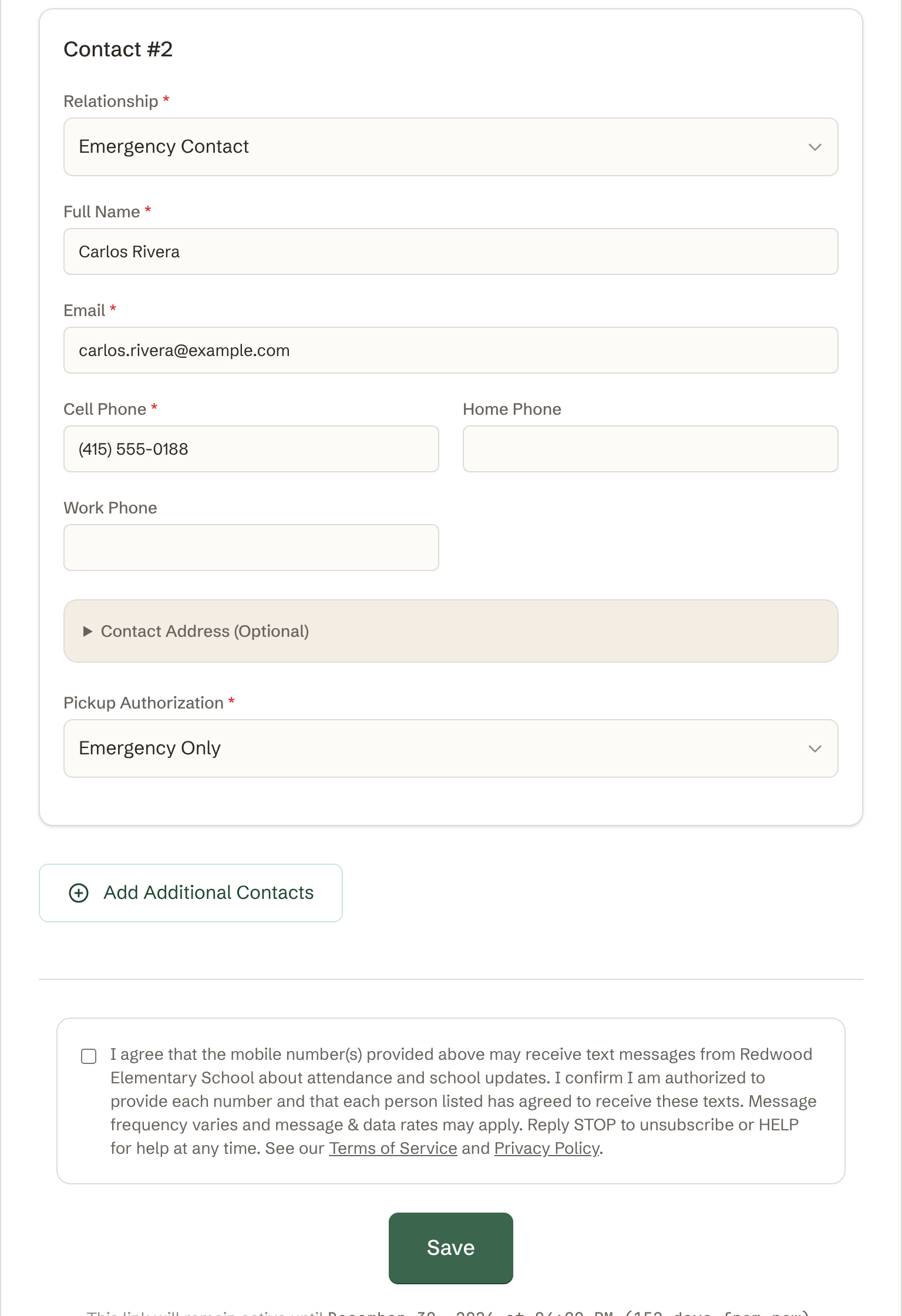
This is the consent checkbox shown on the intake form. The box is unchecked by default, and checking it is optional — the family can submit the form with or without it:
The consent language names Aqui Aca as the sender and the school on whose behalf the messages are sent, states the message purpose and that frequency varies, confirms the person is authorized to provide each number, discloses that message and data rates may apply, explains how to opt out (STOP) and get help (HELP), and links to our Terms of Service and Privacy Policy.
The required Y confirmation
Checking the box on the intake form is only the first step. Before any number can receive attendance notifications or school broadcasts, it must complete a mandatory confirmation: a single text asking the recipient to reply Y. This applies to every mobile number that enters the system — whether it was added through the intake form, entered by staff, imported, or edited later. No number is exempt.
When a number is first seen, Aqui Aca sends exactly one confirmation text:
Aqui Aca messaging for Red Bridge Education. Reply Y to receive attendance and school updates. Msg frequency varies. Msg & data rates may apply. Reply HELP for help, STOP to unsubscribe.
Until the recipient replies Y, that number receives no attendance alerts and no school broadcasts — the confirmation prompt is the only message we send it. This is enforced in the message-send layer itself: an unconfirmed number is skipped before any attendance alert or broadcast can go out, so there is no path that bypasses it. (If a family texts the school first, staff may reply within that conversation, and carrier keywords like HELP are always answered — but no automated alert or broadcast reaches an unconfirmed number.) For each number we record the intake submission time, when the confirmation was sent, when the Y reply arrived, and the reply itself.
When the recipient replies Y, they receive a one-time opt-in confirmation:
Aqui Aca - Red Bridge Education: You’re opted in for attendance and school updates. Msg frequency varies. Msg & data rates may apply. Reply HELP for help, STOP to unsubscribe.
If a recipient replies STOP (or CANCEL, QUIT, UNSUBSCRIBE, END) they are opted out immediately. Replying START re-enables messaging and re-sends the confirmation above, so the Y step must be completed again.
Why the intake form is not a public link
Each intake link is unique to one student and is created by a staff member when a family enrolls; links also expire. This is a deliberate privacy measure — the form collects a specific child’s information, so it is never a single public URL that anyone can browse. As a result, visiting the bare intake domain without a school-issued link shows a “form not found” message rather than the form. This page exists so the opt-in flow and its consent language can be reviewed without exposing a real family’s intake link.
Opting out and getting help
Recipients can text back at any time:
- STOP (or CANCEL, QUIT, UNSUBSCRIBE, END) — stops all further messages. START re-enables them and re-sends the Y confirmation.
- HELP (or INFO) — returns program information. The automatic reply reads: “Aqui Aca - Red Bridge Education: attendance and school updates. Msg frequency varies. Msg & data rates may apply. Help: support+sms@aquiaca.com. Reply STOP to unsubscribe.”
Opt-outs are honored immediately and enforced before any further message is sent. For help you can also email support+sms@aquiaca.com.
The consent step on the live form
Below is the bottom of the intake form as a family fills it in: a contact’s mobile number is entered, and directly beneath, the optional SMS consent box — unchecked by default, labeled “optional”, with the school’s name filled in. The family can submit the form with or without checking it:
Related
- Privacy Policy — including how mobile numbers and messaging data are handled (they are not shared or sold to third parties or affiliates).
- Terms of Service — including the SMS / Text Messaging Program terms.